
SpreadsheetWeb blog
Function: RAND
In this guide, we’re going to show you how to use the Excel RAND function and also go over some tips and error handling methods.

The RAND function returns an evenly distributed random numbers greater than or equal to 0 and less than 1. In this guide, we’re going to show you how to use the RAND function and also go over some tips and error handling methods.
Supported versions
- All Excel versions
Syntax
RAND()
Arguments
The RAND function doesn't require any arguments.
Examples
Simple scenario
=RAND()
Generate between limits
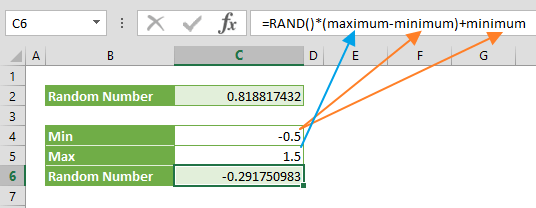
The RAND function returns a number between 0 and 1, but the return value can never be 1. If you want to modify its limits use the following formula:
=RAND()*(maximum-minimum)+minimum
The minimum and maximum values are the limits. As a result, a formula like =RAND()*(1.5-(-0.5))+(-0.5) returns a random number between -0.5 and 1.5.
Tips
- The RAND function is a volatile function that returns a new random real number after every workbook calculation. Press F9 to update the value.
- Microsoft states Excel uses the Mersenne Twister algorithm (MT19937) to generate random numbers.
- Use the RANDBETWEEN function to return a random whole number between specified limits.
- To generate a set of random numbers, select the cells, enter the =RAND() formula, and press Ctrl + Enter (⌃ + Return in Mac).
- Microsoft has announced that they're soon going to release the RANDARRAY function to Office 365 subscribers. This new dynamic array function allows creating an array of randomly generated numbers.